ClipShare: Cross-Device Clipboard and File Sharing Tool
ClipShare is a free utility by Thevindu Wijesekera that shares clipboard content, files, and screenshots between an Android phone and a desktop.
Download ClipShare · v4.3.0ClipShare enables secure sharing of text, files, and copied images across devices, plus it can capture desktop screenshots for viewing on a mobile phone. The app is free, requires Android 7.0 or newer, and has a download size of 0.9 MB. ClipShare is ideal for anyone who needs a lightweight way to move information between a phone and a desktop computer.
- Version
- 4.3.0
- Size
- 0.9 MB
- Requires Android
- 7.0
- Updated
- Oct 19, 2026
- Category
- Tools
- Developer
- Thevindu Wijesekera
- Package
- com.tw.clipshare
- Free
- ✓
App screenshots
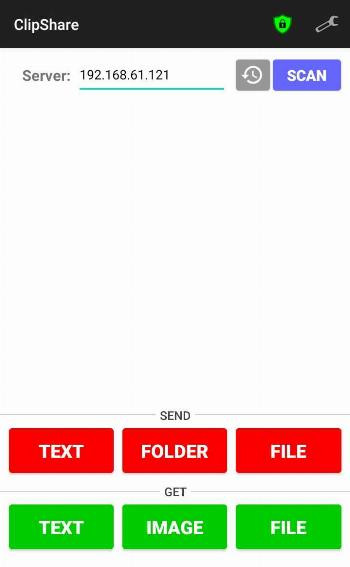
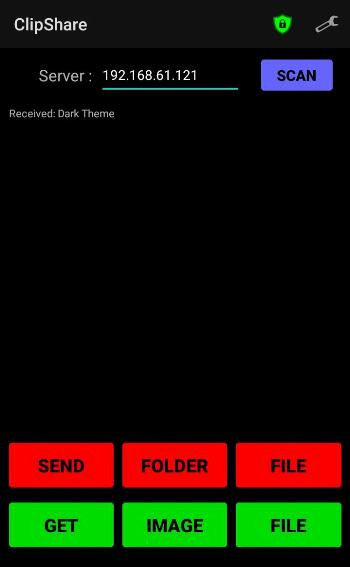
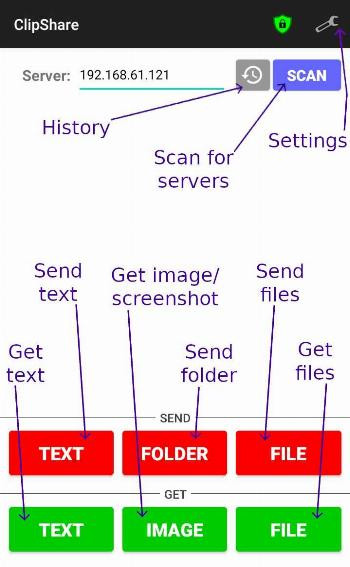
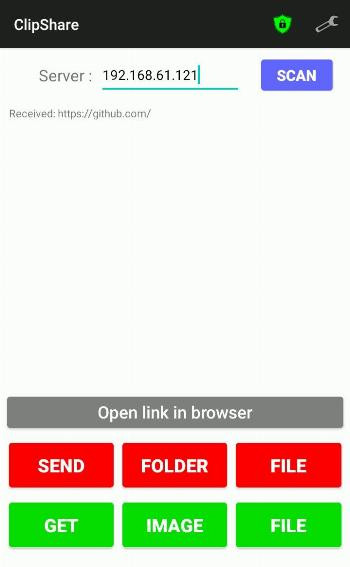
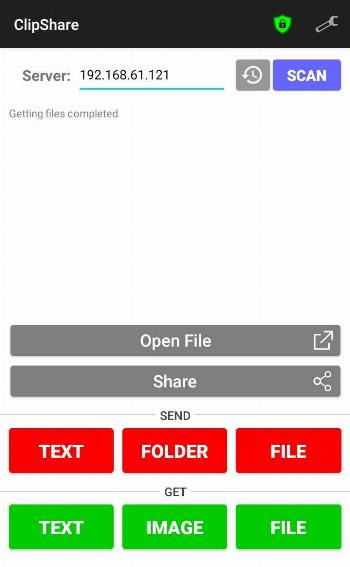
ClipShare is a lightweight Android app by Thevindu Wijesekera that lets you share clipboard content, files, text, and screenshots between your phone and a desktop computer. It solves the friction of moving content across devices by creating a direct connection over your local network, so you can send copied text or files from your phone to a desktop and vice versa without cloud services or cables. The app works with a companion server program that runs on Windows, macOS, or Linux, and it scans your local network to find connected devices. Once paired, you can open received links, files, and images directly from the app, or re-share them with other apps. It includes a secure mode for trusted devices, configurable auto-send options, and adjustable idle timeout. The app is free, open-source (MIT license), and compact at 0.9 MB, with the latest version 4.3.0 released in October 2026.
Key features
- Share copied text, files, and images between your Android device and a desktop computer.
- Capture a screenshot of the desktop and receive it on your mobile device.
- Open received links, files, and images directly from the app.
- Re-share received files and images with other apps on your phone.
- Scan the local network to automatically find server devices to connect with.
- Enable secure mode and add trusted devices for safer sharing.
- Option to auto-send files and text, with a limit to only trusted devices.
- Import and export settings to back up or transfer your configuration.
How to install
- Tap the download button on this page to save the APK file (0.9 MB) to your device.
- When Android prompts, allow your browser or file manager to install apps by enabling the 'Install unknown apps' setting for that app.
- Open the downloaded APK file from your notifications or file manager.
- Tap Install and wait for the process to finish.
- Open ClipShare from your app drawer. Note: this app requires Android 7.0 (Nougat) or higher.
Pros
- Free and open-source with an MIT license.
- Very small file size (0.9 MB) and lightweight.
- Works with Windows, macOS, and Linux desktops via a companion server.
- Supports secure mode with trusted devices for privacy.
- Includes auto-send and idle timeout options for convenience.
- Allows importing/exporting settings for easy backup.
Cons
- Requires a desktop server program to be running—no standalone phone-to-phone sharing.
- Network scanning and file sharing may require permissions that some users find broad.
- No in-app purchase option is mentioned, but the app may rely on external setup.
- Version history is short, indicating a relatively new or niche tool.
Version history
| Version | Size | Requires Android | Updated |
|---|---|---|---|
| 4.3.0 | 0.9 MB | 7.0 | Oct 19, 2026 |
| 4.2.0 | 0.9 MB | 7.0 | Sep 25, 2026 |
| 4.1.4 | 0.9 MB | 9 | Aug 21, 2026 |
| 4.1.3 | 0.9 MB | 9 | Aug 7, 2026 |
ClipShare is ideal for people who frequently move content between an Android phone and a desktop computer—for example, copying a URL from your phone to open on your PC, sending a screenshot from your desktop to your phone, or transferring a file without using email or cloud drives. It suits users who prefer local network transfers for speed and privacy, and who are comfortable running a small server program on their computer. It's also good for tech-savvy users who appreciate open-source software and want a configurable, no-frills utility. Since it requires a desktop client, it's not for those who only need phone-to-phone sharing.
For best results, ensure your phone and desktop are on the same local network. If you want to avoid accidental transfers, enable secure mode and add only the devices you trust, and consider limiting auto-send to those devices. You can also set the idle timeout to automatically close the app when you're not using it, which helps save battery.
Frequently asked questions
Is ClipShare free to use?
Yes, ClipShare is free. You can download and install it without any cost.
Which Android version do I need?
ClipShare requires Android 7.0 or higher. A legacy support APK for Android versions 7 to 9 is also provided for older devices.
How large is the app file?
The ClipShare APK is about 0.9 MB, so it is very lightweight and quick to download.
Do I need an account to use ClipShare?
No account is required. You can enable secure mode and add trusted devices to manage connections directly in the app.
Do I need a desktop program to make it work?
Yes, ClipShare is the Android client, so you need the server program running on a Windows, macOS, or Linux desktop to connect with it.
How do I update ClipShare?
Simply download the newest version from this page and install it over your current installation. The latest version is 4.3.0, updated on 2026-10-19.
ClipShare is a practical, minimalist tool for cross-device clipboard and file sharing over a local network. It's a solid choice if you need a free, open-source way to move content between your Android phone and desktop without relying on cloud services.
Similar apps



Updated: Oct 21, 2026